Click it
Sweepy waits on its dock in the corner. Click it, or use the tray, and it backs out and turns to face the mess.
Free for Windows 10 & 11 Launch week: Pro is 20% off
Click it and it drives out, scans your desktop, and eats the clutter. It always asks before anything goes.
It works like the real thing, just smaller.
Sweepy waits on its dock in the corner. Click it, or use the tray, and it backs out and turns to face the mess.
A lidar sweep maps your desktop, then it drives tidy lanes with its brushes spinning, gobbling files and turning a little circle each time.
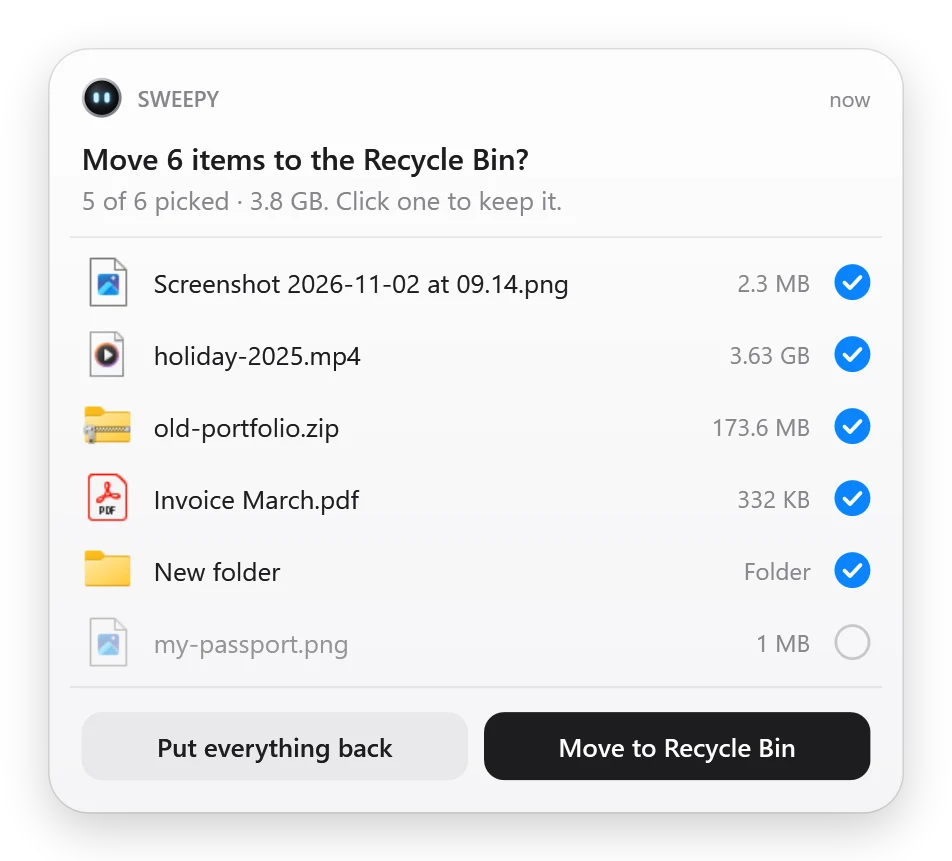
Back on its dock, it shows you everything it picked up. Keep anything. The rest goes to the Recycle Bin, so it's always undoable.
Safe by design
Every file it ate, with its icon and size. Click one to keep it. Nothing is ever deleted for good: it all goes to the Recycle Bin, or into tidy folders on your desktop if you'd rather.
Make it yours
It has moods, too: happy, sleepy, dizzy when you pick it up. Try it.
Sweepy
NEW In Sweepy 1.0.2
Press Ctrl+Alt+F and type a few letters. Sweepy finds it in a moment, runs off, and brings it back. Faster than Windows search, and it even pulls files out of the Recycle Bin.
It lives on your desktop like an icon, not in front of your work.
Show the desktop and Sweepy's still there, on its dock.
Pick it up mid-clean and put it anywhere. It carries on from there.
Drag its dock to any spot. It remembers.
A soft bloop for every file it eats, climbing the scale, and a little chord when it's done. It drives in silence. Or switch them off.
Rather keep everything? It sorts files into Images, Documents, Videos…
Everything goes to the Recycle Bin. Nothing is ever deleted for good.
Under 20 MB of memory and 0% CPU while it waits. Less than one browser tab.
Right-click Downloads, or any folder, and Sweepy cleans that too. (Pro)
Right-click it mid-clean and pick Stop. It cries a little, drives home, and puts everything back.
PRO Sweepy Pro
Your desktop is free forever. Pro sends Sweepy everywhere else: Downloads, leftovers from old apps, junk, big files, on a schedule.
Downloads, Documents, anything. Sweepy drives in and cleans it like your desktop. Or just drop a folder on its dock.
Every loose file sorted into Images, Videos, Documents, Archives and more, right where it is.
Finds what uninstalled apps left behind, old temp files and crash dumps. Often gigabytes.
The videos, archives and installers quietly eating your disk, biggest first.
Every Friday at 5, or whenever the desktop gets busy. Sweepy comes out by itself.
Snow and Midnight come with Pro. Gold, Kitty, Panda, Holiday, Royal and more in the skin shop.
Sweepy Pro
20% OFF · LAUNCH WEEK
$6.99 20% off one time

Skins
$0.99 and up
Gold Edition, Rose, Mint, Kitty, Panda, Holiday, Royal. Or every skin, now and future, for $2.99.

Windows 10 and 11. No account, no ads, nothing sent anywhere.
Pro Downloads, leftovers, junk, big files and schedules for $6.99, once (20% off this launch week). Try it free for 3 days in the app.
Never on its own. It shows you a list first, and only what you leave ticked goes to the Recycle Bin, where you can restore it any time. Or choose Tidy mode and nothing leaves your desktop at all: it's sorted into folders.
App shortcuts, locked or read-only files, code projects (folders with .git), and the Recycle Bin and This PC. Anything you changed in the last 10 minutes is picked up but starts unticked, in case you're still using it.
Yes. Sweepy is its own little window that drives just above your icons. Everything else keeps working, and you can pick Sweepy up and put it somewhere else.
No. Sweepy works entirely on your PC. No account, no tracking, no ads.
No. While it waits on its dock it uses under 20 MB of memory and 0% CPU, less than one browser tab. It only moves while it's cleaning, about half a minute.
Today it cleans your main screen. Second screens are next on the list.
Cleaning your desktop is free, forever. Sweepy Pro is a one-time $6.99 that adds any folder (like Downloads), leftovers from uninstalled apps, junk and temp files, big-file hunts, schedules, smart rules, Fetch everywhere and every skin. You can try Pro free for 3 days in the app, and it's 20% off this launch week.
It only lists app folders whose app is no longer installed and that nothing has touched for months. It never lists Windows, Microsoft or other system folders, starts with only the oldest ones ticked, and everything goes to the Recycle Bin, so one click brings it all back.
Press Ctrl+Alt+F (or pick Find a file in the tray), type a few letters, and Sweepy finds the file and brings it to you: File Explorer opens with it selected, or press Ctrl+C to copy it into an email. Free on your desktop; Pro also searches Downloads, Documents, Pictures, Videos, Music and the Recycle Bin.
No. Pay once through the Microsoft Store and it's yours, on every PC signed in to your Microsoft account.
A question, a bug or an idea: it goes straight to the developer, privately.
It's on its way. If you left your email, you'll hear back, usually within a day.
In short: Sweepy works entirely on your PC. Your files never leave it. No account, no ads, no analytics, no tracking. It only talks to the Microsoft Store, to check what you've bought. This website has no cookies either.